
Character Performance (11 Second Club)

Updated: Aug 29
by Eszter Schmidt
28th of August 2026
For this assessment, it is required to create a short animated shot following the 11 Second club’s competition. The 11 Second Club is an online character animation competition where animators can create short character performances according to the monthly dialogue. For my assessment, I will work with this month’s audio : “Voice 1: We named her after a homeless guy who won the lottery, hoping he'd put her in his will, but Old, Old Dolio used up all his money at the very end on experimental cancer stuff. Voice 2: Okay.” I will utilize body language and facial expressions in order to maximize communication.
BODY LANGUAGE
Body language is a form of non-verbal communication that enables illustrators and animators to convey a character's role, personality, and emotions. By making the right choices, we can create a narrative that conveys the character's feelings, thoughts and intentions while also emotionally connecting with the audience. Understanding body language and maximising it in our work is critical. Live-action referencing can be a great tool in this. Acting out scenes can be a great help in studying movement and articulation and achieving realistic movement.

FACIAL EXPRESSION
While body language is a great tool for conveying a narrative, facial expression is an outstanding way of communication. By itself, it can tell a story, emotion and intent, making it a primary instrument. The use of facial expression can be seen throughout art history, used by artists to convey idealized characteristics and, over time, realistic emotions.
EYE EXPRESSION
As mentioned earlier, the eyes are among the most expressive features, adding authenticity to characters. Convincing eye movement can communicate emotions and inner thoughts. The eyes, pupils and brows can communicate a lot by themselves. Sparkling eyes, rapid movement, lifeless gaze can all suggest different emotions and a psychological state, while manipulating empathy or dislike.
PLANNING

Idea development for dialogue:

The scene for this dialogue will be a vet consultation room. The main character is the owner who starts a random conversation involving the pet. At the end of the dialogue the vet says only one word “okay”. The aim is to achieve a shot with a humorous tone. The chosen rigs for this are the Chameleon rig by Truong CG Artist, the Tina rig as the main character by Casey, and the Waitress rig as the doctor by Santiago Calle.
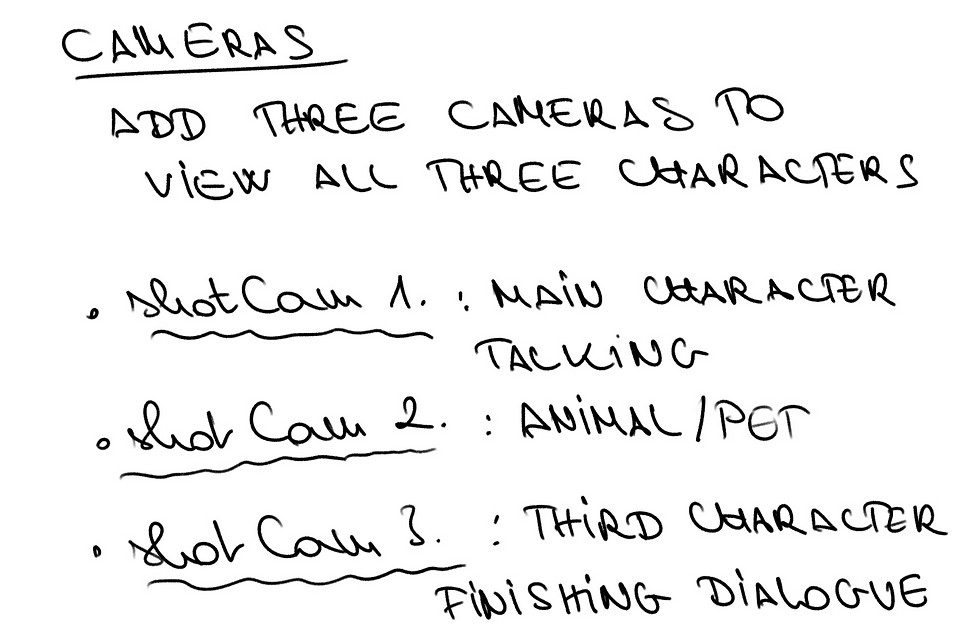
Camera shots and angles are important in animation because they help show the setting, characters, and emotions. Wide and medium shots can show where the character is, while close-ups and different angles can show their feelings. The composition of the shot can also create different moods, such as using empty space to make a
character feel lonely or vulnerable (Adobe, 2026). For this shot, close-up camera angles would be beneficial to convey the characters' feelings and state of mind.

Props & environment
The scene for this dialogue is planned in a vet consultation room. As no suitable environment was available for the shot, I need to build one. Not many details are required as cameras will closely focus on character performance. Room with entrance door in the background and one or two little details reflecting the place of the conversation (poster with animal silhouette - dog & cat).
The third character playing the vet requires a veterinary coat/scrubs or a stethoscope. In the end, I used a stethoscope on Turbosquid, which helped establish the character's profession. The prop I found is 3D Doctor Earphones Medical Equipment by 3dmonster8383.
CHARACTER PERFORMANCE SKETCHES


CHARACTER PERFORMANCE DEVELOPMENT
Pet owner character

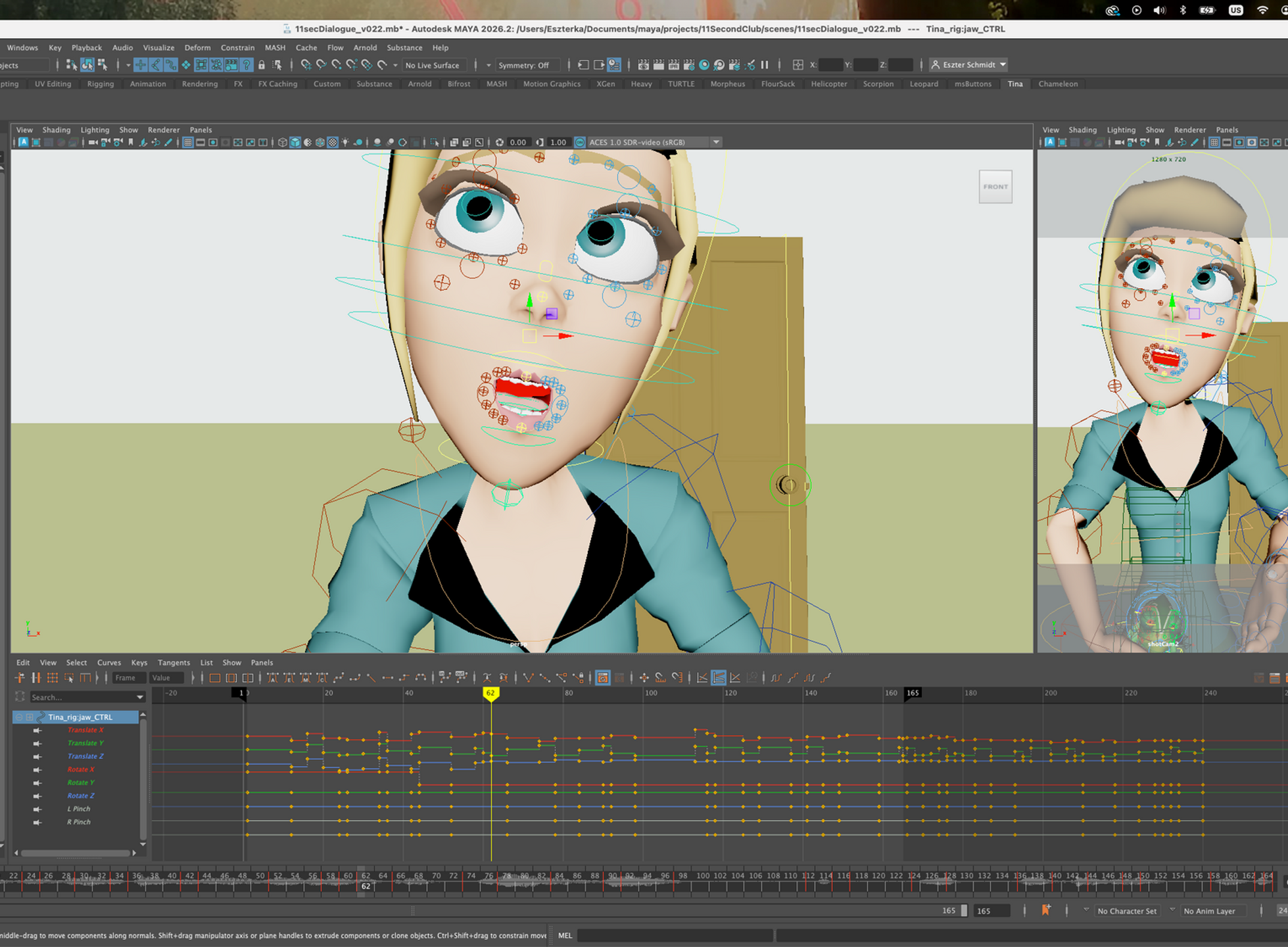
For the pet owner’s performance I chose the Tina rig. This character had the biggest part in the dialogue, so it was particularly important to start the work with stepped curves. It was a great help to act out the performance several times to see what kind of movement would feel natural. The first thing I did was that I positioned the character’s head the way I imagined she would talk and look at the pet in her hand. Only after that did I start working on the lip-sync. This was a long and time-consuming process and the character’s tilted head made it even harder to work on the lips. I realized it would have been more efficient to do the mouth shapes first as the head's position caused unusual lip positions and
the lips to slide during speech.

Once I was happy with the blocked out key mouth shapes, I carried on with working on the eye expressions and added blinks to provide more flexibility. When the facial performance was in a good place, I continued with the body language by adding shoulder and arm movements. I also imported the second character into the performance and positioned it into
the owner’s hand. As the owner’s hands were constantly in motion, it was important that the chameleon moved with it by using a parent constraint.
When I was happy with the blocked key poses everywhere, I acted out the performance a couple of times again to see whether there was anything to be changed. The next step was to polish the work and turn stepped curves into spline curves. Here I needed to do a lot of refinement because of the previously mentioned difficulties with the lipsync and head position. However, this process helped me understand how important it is to plan facial performance before adding detailed movement.
Chameleon character
The Chameleon character also plays an important part in the shot as it is the subject of the conversation. I didn't plan much of a performance for it, but I wanted to make sure it had a close-up shot. The idea was that the audience could get a closer view of the subject of the talk and further emphasize the humorous tone of the dialogue. As part of its performance I planned to add eye and tongue movement.

First I had some difficulty with setting the key frames, as the control curves were hidden and I had to search for them in the Outliner. Once this issue was solved, I went ahead with the eyes and the tongue. For this I used live motion references to make sure it is realistic and believable. I also wanted to make sure to
fit everything into the limited time and number of keyframes, but also to avoid that everything happens at the same time.
Vet character

The Waitress rig was great for my work. As I couldn't find scrubs for her, I decided to remove the tie and suspenders. Her white shirt resembled a health care professional’s coat, while the stethoscope further emphasized
what her role is. I had some difficulty with the rig’s textures on her face but managed to solve it by accessing Hypershade and deleting the Transparency node linked to the body texture.

Once I added the key poses for the lipsync with stepped curves, I developed the performance with further body language and eye expressions. The eyebrows were
particularly helpful in addressing the character’s possible thoughts. When I was happy with the blocking of the important parts in stepped curves, I converted them into spline curves and cleaned up the curves.
FINAL DEVELOPMENT AND REFLECTION
After completing the main blocking, I reviewed the animation and made further adjustments to the timing, lip-sync, facial expressions and body language. I also checked the camera composition and made sure the three characters could be clearly understood in the different shots. One of the main things I learned from this project was the importance of planning the performance before starting detailed animation. Acting out the dialogue helped me understand the timing and natural movements of the character. I also learned that working with stepped curves first made it easier to focus on the key poses before refining the movement with spline curves. The project also involved some technical challenges, including working with different rigs, attaching the chameleon to the character's hand, and fixing texture issues on the vet character. Solving these problems helped me become more confident working in Maya.

FINAL ANIMATION LINK: https://youtu.be/QJJLx8Ts510
References:
Adobe (n.d.) ‘Different types of shots and camera angles in film’. Adobe. Available at: https://www.adobe.com/creativecloud/video/production/cinematography/camera-shots-and-angles.html (Accessed: 28 August 2026).
Animalogic (n.d.) ‘[Video about animal movement/behaviour]’. Facebook. Available at: Animalogic Facebook video (Accessed: 28 August 2026).
Bishop, R.D., Boo, S., Cruz, M.R. and Gadea, L. (2020) Fundamentals of Character Design: How to Create Engaging Characters for Illustration, Animation & Visual Development. Worcester: 3dtotal Publishing.
Williams, R. (2002) The Animator's Survival Kit: A Manual of Methods, Principles, and Formulas for Classical, Computer, Games, Stop Motion, and Internet Animators. London: Faber & Faber.
Rigs:
Truong CG Artist (n.d.) Chameleon Cartoony Rig. Gumroad. Available at: https://truongcgartist.gumroad.com/l/chameleonrig (Accessed: 28 August 2026).
The Robot Forge (n.d.) Tina Rig for Maya. Gumroad. Available at: https://therobotforge.gumroad.com/l/AOcDo (Accessed: 28 August 2026).
Santiago, C. (n.d.) Waitress Rig. Gumroad. Available at: https://callesantiago.gumroad.com/l/waitress(Accessed: 28 August 2026).
Props:
TurboSquid (n.d.) 3D Doctor Earphones Medical Equipment. TurboSquid. Available at: https://www.turbosquid.com/FullPreview/2100273 (Accessed: 28 August 2026).
TurboSquid (n.d.) 3D Cat cartoon Rigged model. TurboSquid. Available at: https://www.turbosquid.com/FullPreview/1874375 (Accessed: 28 August 2026).
TurboSquid (n.d.) 3D dog cartoon. TurboSquid. Available at: https://www.turbosquid.com/FullPreview/1213132 (Accessed: 28 August 2026).
TurboSquid (n.d.) free ma mode windows. TurboSquid. Available at: https://www.turbosquid.com/FullPreview/875594 (Accessed: 28 August 2026).
TurboSquid (n.d.) basic door handle obj free. TurboSquid. Available at: https://www.turbosquid.com/FullPreview/955632 (Accessed: 28 August 2026).

Comments